SOP 04 · Property setup · 2026-10-12
Create a property
Create the property record that the rest of setup uses.
Before you start
Have the approved property name, postal address and time zone. Organization-level creation access is required.
Open Manage > Set up or add a property
Step 1 Open property setup
Select Manage, then Set up or add a property. Locate Create address-only property.
Step 2 Enter the property identity
Choose the organization, enter Property name and verify Time zone. The default time zone may not be correct for this property.
Step 3 Choose and check the address
Use the address search and select the matching address. Review the structured address fields and correct them before submission.
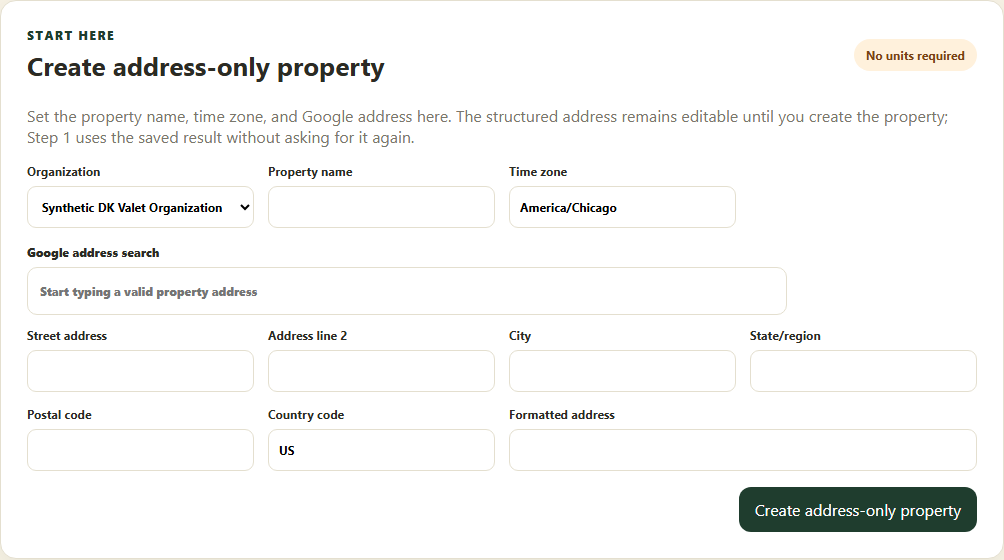
Enter the property identity and review the structured address before creating it. Application screenshot with training data. Select the picture to enlarge. Step 4 Create and select the property
Select Create address-only property and wait for the success message. Select the new property to continue its readiness steps.
Check your result
The property appears in the authorized selector with its saved name and address.
If something goes wrong
If creation is unavailable, ask an organization administrator. An address-only property still needs boundary, eligible people, weekly times and a published unit route.